Got the AE900 in Thursday...

Collapse
This topic is closed.
X
X
 
  • Time
  • Show
Clear All
new posts
  • KeithM
    Senior Member
    • Oct 2005
    • 285

    #1

    Got the AE900 in Thursday...

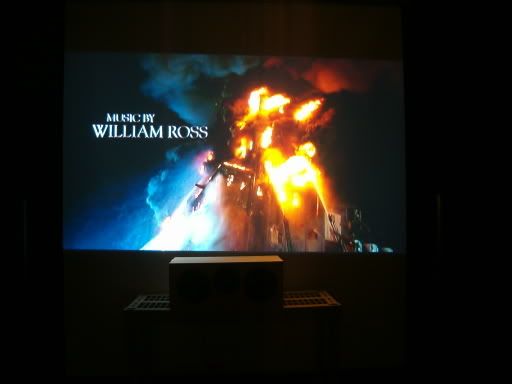
    ...but I'm a little dissapointed in my black levels as of right now. Here's a picture I took today. Since my camera is absolutely horrible, it doesn't show how great this projector is. However, you can see that the contrast levels cannot be 5500:1 as claimed.
    This is most likely due to my white walls, carpet, and ceiling, but how much better do you think I can get if I repaint the walls Behr Song Bird, which is essentially, blue, and also replace my screen with a higher-contrast silverscreen DIY screen?


    As for my review part of the ae900, it's absolutely amazing. I had plans to go to the movie theater Friday, but they were forced to be cancelled because of this. The colors are incredibly accurate on this projector, not to mention clean. Even with an s-video run 12 ft, it was hard to make out much noise or anything like that. The image is also incredibly bright and white. Even with my lamp power on low, a bright scene will light up my entire basement, including a bend to the main room and a bend into the bathroom. I used to have lights on incase I had to get up for something, but now I just wait for a bright scene and pause it. Also, when I tested this projector out, the black levels were incredibly good due to a good room for a big screen. Almost anything can be calibrated, so the image looks just how you want it to look.
    Another thing I love is the smooth screen feature. When I first sat down to watch a movie with my parents, my mom actually said,"Where are the pixels?" She was sitting on the floor very close to my 76" screen when she said that. I can make out no pixelation on this model when I'm sitting 1.5 screen lengths away. The dynamic iris is also very good. Bright when you want it to, darker when you need it. I never thought I'd care too much about this feature, but after watching 2 movies, I love it.
    The included remote is also very nice for someone who doesn't want to spend 100 dollars when you can do almost the same thing with a cheap one. remote navigation is a bit on the annoying side, but backlighting and a nice LCD screen make up for it. With my big hands, it's hard for me to find a remore where I don't accidentally press other buttons. This remote is spaced out just right for my big hands.

    One thing I have noticed is that sometimes when you take the lens cover off, you will push the lens out of focus. It's a very small hassle but it will probably tighten up later on.

    I bought this for 1840, plus the 400 dollar rebate and the blockbuster card(for 40 rentals). Since rentals are 3 dollars where I live, I ended up getting this amazing image for only $1320 after rebates. I've looked at many TVs and a few projectors, and I strongly believe that anyone looking for a screen even under 2000 should strongly try looking at this projector. I just wish I had a good camera to capture how amazing the picture quality is.


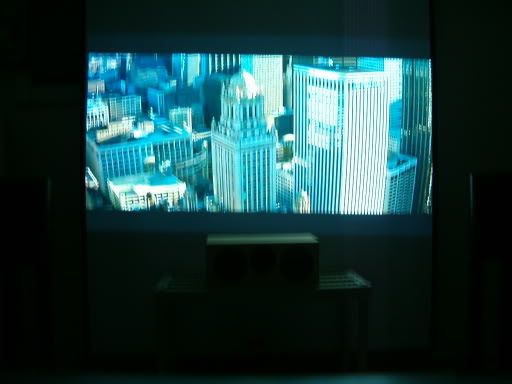
    This is a massive upgrade from the old 100:1 contrast projector seen here(with the same horrible camera)
  • draganm
    Senior Member
    • Jul 2005
    • 299

    #2
    Originally posted by KeithM
    ...but I'm a little dissapointed in my black levels as of right now. Here's a picture I took today. Since my camera is absolutely horrible, it doesn't show how great this projector is. However, you can see that the contrast levels cannot be 5500:1 as claimed.
    there probably is that much contrast range, but it's going to be at the upper end of the spectrum, if your looking for true black's not even the Sony Ruby can do that. the only projection Tech. that can slam to full black is CRT, and it's all meaningles in a lit room because black is the absence of light, you don't "project" black.
    Originally posted by KeithM
    This is most likely due to my white walls, carpet, and ceiling, but how much better do you think I can get if I repaint the walls Behr Song Bird, which is essentially, blue, and also replace my screen with a higher-contrast silverscreen DIY screen?
    This is a big problem in most DIY starter home theatres. I would try and stay away from pure colors like Blue because they will cause a color shift on your screen. Go with very dark Gray-blue if that fits your taste. Of course black walls ,ceiling, and floor are perfect if the wife will go for it.8) A dark ceiling, black screen wall, and a dark rug in front will get you 80% of the way there.

    Originally posted by KeithM
    Even with an s-video run 12 ft, it was hard to make out much noise or anything like that. The image is also incredibly bright and white. Even with my lamp power on low, a bright scene will light up my entire basement, including a bend to the main room and a bend into the bathroom. I used to have lights on incase I had to get up for something, but now I just wait for a bright scene and pause it.
    well "bright" is what bulb machines do best. I hope 12 feet of S-video is temporary, I won't type out what the S stands for
    Originally posted by KeithM
    I can make out no pixelation on this model when I'm sitting 1.5 screen lengths away. The dynamic iris is also very good. Bright when you want it to, darker when you need it. I never thought I'd care too much about this feature, but after watching 2 movies, I love it.
    2 movies always look great, as with Audio your vision wil get more pickey and your wallet will become mroe empty as the years go by. It's great you can sit that far away, my back row of seats is about 1.5 but I like to sit up front. It takes a litle getting used to, most first time visitors garvitate towards the back row for some reason.
    Originally posted by KeithM
    I bought this for 1840, plus the 400 dollar rebate and the blockbuster card(for 40 rentals). Since rentals are 3 dollars where I live, I ended up getting this amazing image for only $1320 after rebates.
    at that price it's hard to argue with something so simple to operate and enjoyable to watch. You should get 3 or 4 years out of it before it needs replacing with maybe a bulb or 2 along the way.

    Comment

    • Chris D
      Ultra Senior Member
      • Dec 2000
      • 16875

      #3
      Colored walls and ceiling will do wonders for you. I use a very dark midnight blue that works very well. Looks black with the lights off watching a movie. With lights on, brings life and a bit of color to the room instead of just flat black.
      CHRIS

      Well, we're safe for now. Thank goodness we're in a bowling alley.
      - Pleasantville

      Comment

      • Jack Gilvey
        Senior Member
        • Aug 2001
        • 509

        #4
        The 5500:1 claim is for full on/off (thanks to the iris), which is different from mixed-scene/ANSI. I find the perceived contrast is about the same as my 4805, really quite good in my darkened, light-controlled room.
        On the whole, the pj is really nice, and I can sniff my 2.35 screen w/o seeing SDE.

        Comment

        • aud19
          Twin Moderator Emeritus
          • Aug 2003
          • 16706

          #5
          Ideally, yup the room should be flat black, other options include a "neutral" dark grey or otherwise VERY dark shades of which ever colour you prefer in that order.
          Jason

          Comment

          • KeithM
            Senior Member
            • Oct 2005
            • 285

            #6
            Yes, the s-video is temporary. I hope to get an oppo hooked up on the hdmi connection in a week or so. Chris, do you have a picure of what your your theater to give me an idea for what color would look good? I personally could care less if my theater is the ugliest thing it the neighborhood, but I'm still living with my mom until college, she gets to decide paint and said that blacks and dark greys are out of the question, along with all reds, oranges, greens, and browns.

            Comment

            • Chris D
              Ultra Senior Member
              • Dec 2000
              • 16875

              #7
              Sure, I have a few threads going in "Spaced Out" of my theater. Let's see if I can find any.

              Okay, check out my thread here for some color pics:

              CHRIS

              Well, we're safe for now. Thank goodness we're in a bowling alley.
              - Pleasantville

              Comment

              • KeithM
                Senior Member
                • Oct 2005
                • 285

                #8
                Originally posted by Chris Dotur
                Sure, I have a few threads going in "Spaced Out" of my theater. Let's see if I can find any.

                Okay, check out my thread here for some color pics:

                http://www.htguide.com/forum/showthread.php4?t=18352
                Actually, I was thinking of darker than that, but it looks very black with the lights off. Thanks for the pictures. Also, as a general question, how important would it be to get a dark ceiling? The top of my screen is around 3 feet from the ceiling, but the ceiling is fairly glossy. I found a place I can get black carpet pretty cheap, so I think I'll get some and use it as a rug.

                Comment

                • Chris D
                  Ultra Senior Member
                  • Dec 2000
                  • 16875

                  #9
                  Ceiling is important, and the most often overlooked part of the theater. The midnight blue that I talked about in my theater is on my ceiling. The side walls are somewhat lighter colors, blending from a medium-dark blue on the upper half to a dark grey on the bottom half to a medium-dark grey carpet. Idea there was for it to get darker and darker the farther up on the walls you went in my theater, like a night sky.
                  CHRIS

                  Well, we're safe for now. Thank goodness we're in a bowling alley.
                  - Pleasantville

                  Comment

                  • Azeke
                    Super Senior Member
                    • Mar 2003
                    • 2123

                    #10
                    Keith M,

                    Congratulations on your AE900U purchase, it certainly provides excellent bang for the buck. There is a tweak forum over at avsforums for the AE900, which provides a reference for calibration, including filter calibrations. I have tried the the 77mm 81C filter and I didn't like what it provided, of course that is my personal opinion.

                    The main thing is to ensure you keep the filter clean to provide prolonged bulb life (every 100 hrs.). Enjoy your new toy.

                    Peace and blessings,

                    Azeke

                    Comment

                    • KeithM
                      Senior Member
                      • Oct 2005
                      • 285

                      #11
                      Azeke,
                      I found an AE900 that I demo'd with various filters and I didn't care much for the 81c filter either. I think right now for money costs I'll just stay without a filter. I still have to get an oppo, a dvi->hdmi cable, paint, and finishing projects in the theater anyways. ops:

                      Comment

                      • Azeke
                        Super Senior Member
                        • Mar 2003
                        • 2123

                        #12
                        Good luck Keith.

                        Peace and blessings,

                        Azeke

                        Comment

                        • KeithM
                          Senior Member
                          • Oct 2005
                          • 285

                          #13
                          well I got the painting partially done(one wall to go) and here's the most recent pictures, still taken with a horrible camera.

                          Next will be getting the final screen built. I did a test where I covered the parts of my ceiling-to-floor screen (it was free) that I wasn't using with a sheet that was similar to my wall color and that also helped.

                          Comment

                          • CraigJ
                            Senior Member
                            • Feb 2006
                            • 519

                            #14
                            Hi Keith,

                            Excellent job on your HT. An inexpensive piece of felt placed over your center speaker will absorb the bright light coming off your screen. Cost $4 per yard from Jo-Ann Fabric.

                            Craig

                            Comment

                            • KeithM
                              Senior Member
                              • Oct 2005
                              • 285

                              #15
                              I'm going to paint it this weekend hopefully while I'm building the frame for my screen, along with hopefully finishing my center stand.

                              Comment

                              widgetinstance 227 (Related Topics) skipped due to lack of content & hide_module_if_empty option.
                              Working...
                                Searching...Please wait.
                                An unexpected error was returned: 'Your submission could not be processed because you have logged in since the previous page was loaded.

                                Please push the back button and reload the previous window.'
                                An unexpected error was returned: 'Your submission could not be processed because the token has expired.

                                Please push the back button and reload the previous window.'
                                An internal error has occurred and the module cannot be displayed.
                                There are no results that meet this criteria.
                                Search Result for "|||"